Frequently asked questions
Short and honest, also about what doesn't work (yet).
Voor kletskousen: Bel met de B03M-babbel-B0X!
010-8700808Short and honest
General questions
What is B03M?
Your data, your AI. B03M thinks along, you decide. One place for everything going on at home and at work. B03M FAM is for the family: calendar, food, groceries, photos, pocket money and games. B03M W0RK is for freelancers and small businesses: Messages, a knowledge base, clients and boards. One account, two environments that can't see each other.
How do you pronounce it?
Boom. The zero and the three are just for show.
What does it cost?
That's on Pricing. In short: 30 days free from the moment you open your invite link, and FAM comes with W0RK.
Does it work on my phone?
Yes, in the browser, and as an app on your home screen. There it works like a normal app, with notifications. B03M isn't in the App Store or Play Store.
In which language?
Dutch or English, set per person. A child can have a different language than their parents. With the family language you pick the language for every child that didn't choose one themselves.
Can I install B03M on my own server?
No. B03M runs on our side.
B03M FAM questions
Can my kids join in?
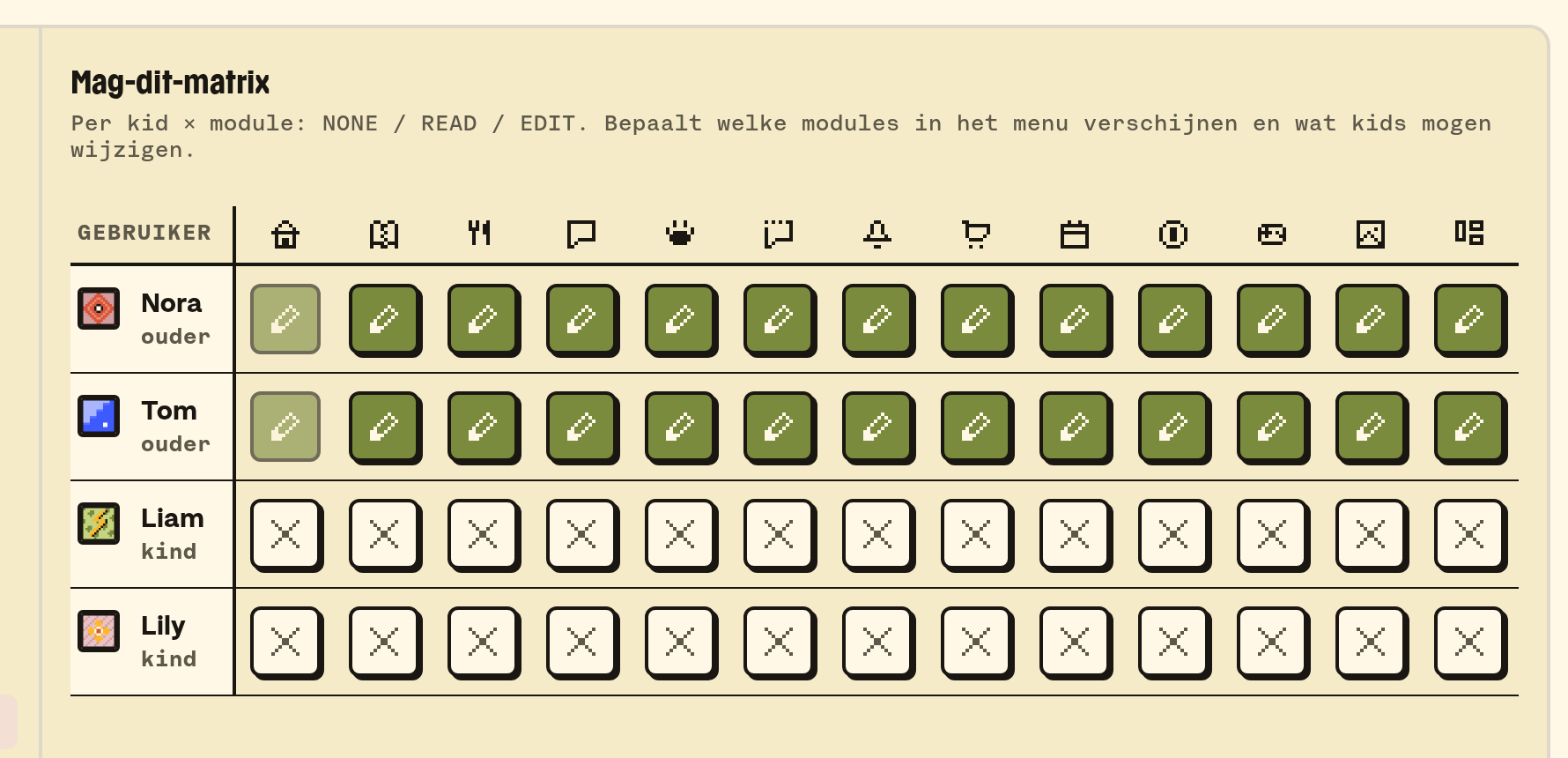
Yes. A parent adds them, and per child you set in the May-I matrix what they can see and do. A child doesn't log in on their own: they come in through a parent. A child has their own screen, and the way back to a parent's account sits behind a PIN. More about kids.
Can grandpa or the babysitter join too?
Yes. Everyone who belongs is in there with their own profile and their own rights per section. Grandpa, grandma and the babysitter are adults. Only the parents manage the family settings.
Does the shopping list work with my supermarket?
No. B03M has no link with any supermarket. The list is a list, and the whole family shares it.
Can the school calendar go in?
Yes, if the school (or your work) gives you a calendar link: an iCal address, like with Parro, Outlook or Google Calendar. How the calendar works.
B03M W0RK questions
Who is W0RK for?
For anyone with their own business who answers questions every day: by mail, under a blog, with an order. Alone or with a small team.
Does B03M send mail on my behalf by itself?
No. B03M writes a draft when your knowledge base has something to say about it. You press Approve, and then Send. Without those two clicks nothing leaves the building. How Rapid Reply works.
What can I connect?
Email (Gmail, iCloud or your own mail server), comments on WordPress, orders from WooCommerce, and MailBlue. That last integration is still in development. Other channels aren't there yet.
Do I need a family to use W0RK?
No. A work environment stands on its own. Got both? Then you switch with one key.
Can my team join?
Yes. You invite people as admin, colleague or guest, and set per section who can read or write. How to get started.
Does W0RK work with ChatGPT or Claude?
Yes. Through SM1TH you connect W0RK to your own AI tool. That works with MCP, an open standard that lets AI tools talk to other services. Your tool can then search your knowledge base and suggest knowledge. What your tool fetches does go to that service, under their terms.
Am I stuck with B03M?
No. Switch to another AI tool, and you make a new connection and your knowledge stays put, because it lives in W0RK and not in the tool. And if you want to leave us, the owner requests an export of the data. That way you take what you built to somewhere else.
Privacy and security questions
Where is my data?
On our own servers at Hetzner in Germany. The privacy page lists per service what goes there, and why.
Do you track what I do?
We keep track of where B03M goes wrong and where it stutters, so we can make it better. No files, no profiles, no ads, and we sell nothing. The statistics don't know who you are.
Can I request or delete everything?
Yes. Mail yo@boem.top. There's no button for it in the app yet, so for now that goes by mail.
How is my account secured?
With your password, and if you like with two-step verification: a code from an app like 1Password or Google Authenticator. Try a wrong password too often, and you wait a quarter of an hour. More about your account.
AI questions
Does everything I type go to an AI?
No. Only when you use an AI feature, and then only what that feature needs. Photos, passwords and payment details never. What goes where, per feature.
Which AI does B03M use?
Mostly the Mistral Large 4 model, through Ollama Cloud, which hosts the models. For the voice in the little ones' corner, ElevenLabs. Your data is on our own servers in Germany; an AI request goes to those services, with only what the feature needs. More about AI in B03M.
Can I use my own AI key?
In W0RK, yes: connect your own key (for example from OpenAI or Mistral), then you pay for your own usage and have no limit from us. In FAM we take care of the AI.
Is KletsGPT safe for kids?
KletsGPT knows who's typing and how old they are, filters what comes in and checks what goes out. If something serious happens, the parents get a notification. It's still a chat with an AI: keep an eye on it. KletsGPT is still in beta and is switched on per family. More about KletsGPT.
Getting started and contact
How do I get into B03M?
Through the waitlist. For now, B03M is by invitation only. Join the waitlist for FAM or W0RK. We invite small groups at a time and help you get started personally, with a business account too. 30 days free from the moment you open your invite link. After that, everything stays visible, and you can make changes with a subscription.
How do I reach you?
Mail yo@boem.top. We read everything, and answer as fast as we can. Is it about your account? Then mail from your account's address. More on the contact page.
Where do I read how something works?
In the docs, per topic, including what it doesn't do (yet).
Laatst bijgewerkt op 3 november 2026.