Home · my overview
The column on the right with what's ready for you. On your phone you swipe it into view.
Voor kletskousen: Bel met de B03M-babbel-B0X!
010-8700808What's ready for you
My overview is the column on the right in B03M. It shows what's ready for you in the environment you're in: your post, your calendar, your lists. Whatever Home shows, My overview is always next to it.
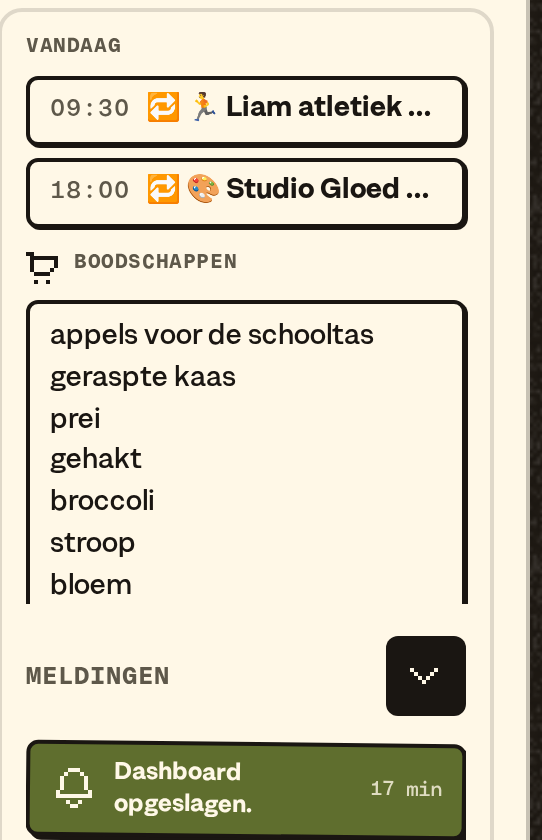
What's in it
- B03MB0X: what came in at your B03MB0X address. How B03MB0X works.
- Today: what's in the calendar today.
- In FAM the groceries.
- Notifications, at the bottom. The little arrow folds them into one line; it stays that way on that device. More about notifications.
- In W0RK your tasks: My tasks is every card with you as the handler, from any board. Below that, My parked mails. Type a task straight into the field below; it lands on Loose tasks.
Two swipe gestures on your phone
- From the right edge to the middle: My overview follows your finger. Let go too early, and it slides back. Swiping right closes it, also following your finger.
- From the left edge: one step back. From a card to the list, and then to the first tab. It goes no further.
Swipe from the left, and a little circle comes along from the edge. When it gets colour, it's far enough. Let go earlier, and nothing happens. On the first tab the circle gives a little shake: there's no further back.
Hold your phone sideways, and My overview is at most as wide as on a computer. If "reduce motion" is on on your phone, no panel slides: it's in place right away.
Best as an app
The gestures work best when B03M is on your home screen as an app. In the browser, swiping from the left is often the browser's own back button, and that wins.
How to put B03M on your home screen, on an iPhone in Safari:
- Open B03M in Safari.
- Tap Share.
- Pick Add to Home Screen.
- From now on, open B03M from your home screen.
On Android, B03M offers Install itself. Don't see it? Look in your browser's menu.
What it doesn't do (yet)
- Swiping on a computer or a big screen. My overview is already in view there.
- Going further back than the first tab. You go to another module with the dock.
More about how B03M is laid out: Getting started. Tasks on your boards: Boards.
B03M gaat stap voor stap open. Kies je lijst, dan nodigen we je uit zodra er plek is.
Laatst bijgewerkt op 1 november 2026.